Sierpinski’s Triangle

close up photo of green fern leaf
Photo by Tausif Hossain on Pexels.com

What do ferns, snowflakes, seashells and broccoli have in common? They are all fractals, of course! Fractals are fascinating and they are a great way to add some spice to your exponential functions unit. Have I told you how much I love exponential functions lately? I have a ton of exponential functions resources in my TpT store. In the Exponential Functions Stations Resource, I have a Sierpinski’s Triangle activity. What a great way to mix Art, Geometry and Algebra! The Sierpinski Triangle is an example of a fractal and an exponential function. I love the fact that so many real life objects can be examined through fractals and exponential functions.sierp-det Recently, I turned my Sierpinski Triangle activity into a google slides activity. I added some videos and an interactive fractal web page. I’d like to share this with my followers because I think that you will find it interesting and engaging for your students.

Young students can explore the Sierpinski triangle as well. Any math class that discusses triangles or patterns, could enjoy this activity. Change the google slides to fit your needs.

There’s more than one pattern that can be explored. In the pictures above, you could count shaded triangles each time to get, 1, 3, 9, 27, 81…  or count the unshaded triangles to get 0, 1, 4, 13, 40… which is increasing each time by 1, then 3, then 9 and so forth which is related to the first pattern. You can discuss area and perimeter of the inside triangles and see what patterns may occur! Mind Boggling! 

Another fun activity involving Sierpinski’s triangle is to build a 3-dimensional one. If you have a die cut machine at your school with a triangle pattern, you can make enough for each student in your classroom and get them to connect them in such a way to produce the pattern over and over and make it larger and larger. Google: Sierpinski’s Triangle in 3-D and look at the images. It’s very cool!

Are you ready to receive my Sierpinski’s Triangle Google Slides Activity? Click here and make a copy! Enjoy and please consider following my blog as well as my TpT store so you can continue to receive math activities similar to this one.



5 Reasons Why You Need To Use Google Forms for Quizzes in Your Classroom

I don’t know what I would do without google forms! I have 150+ students this year and I’m teaching three different subjects. Google form quizzes have saved me! I recently made a google form quiz template that I will share with you at the end of this blog. Here are the reasons I love google forms for quizzes:

  1. TIME SAVER – Yes, you have to spend time making the quiz upfront, but the time you save on not grading the quiz is so worth it. I love that the quiz grades itself. You can even send students their results by email. You can share a copy of the quiz with other teachers. They can take the copy you give them and edit the quiz to work for their classroom. It would be great to alternate with a fellow teacher on making the quizzes. Again…big time saver! Once you have made your quiz, it automatically saves in your google drive. Now you have it for next year!
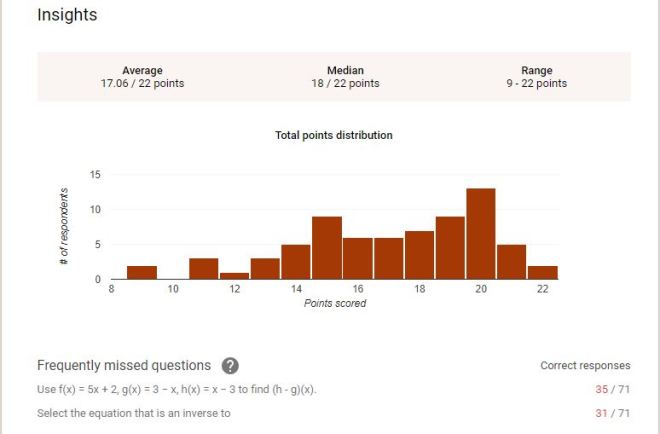
  2. ANALYTICS – When the students are finished taking the quiz, you can view the data! At the top of the google quiz, there is a tab for responses. In the response tab, you can view the summary, individual questions or individual students. You can’t get this from your paper assessments! Well, you can if you feel like spending a million hours figuring it all out! The data is very helpful! The picture below shows some data from one of my recent Algebra II tests. Take note of the most missed question! I love that I get to see what the students struggled with the most. This helps me with planning.goo2
  3. TEACHER ERROR – Do you ever make mistakes? I do! If you make a mistake on the quiz, just go fix it. If the students have already taken the quiz and you made a mistake and forgot to mark an answer in the answer key, then fix it. The google form will automatically make updates to the grades for each student. There are many times when my first period class will notice a grammatical error. I’ll fix it before the next class. It updates and saves automatically.
  4. GOOD FOR SUBS – When I know I’m going to be gone, I love to plan a quiz. No papers to copy, grades will be automatically generated and the sub really doesn’t have to do anything but keep an eye on the students! I hate being absent because it seems like it’s more work than it’s worth. Now I can take a mental health day and feel good about what the students have done while I’m gone.
  5. SIGN OF THE TIMES – We can’t hide from technology. I’ve been teaching for 32 years and I want to be up on what’s out there! Some teachers don’t want to mess with google forms because they feel like it will be too complicated. It is not complicated! Dive in! You can handle it. It just takes practice. I’m leaving you with a quiz template. Make it  your own. You will love it once you’ve become familiar with it.

*You will need a gmail account to create a google form.

Google Form Quiz Template

Visit my TpT store to find great resources like the ones below:

208a4-slide1Slide1

Using Desmos in your Class Blog/Website

My BlogI love Desmos, so when I discovered how to use HTML code to add a desmos practice graph on my blog, I was ecstatic. If you are not familiar with Desmos and you are a math teacher, you need to visit the desmos.com site!

I use my class blog for many things:

  1. Lesson Plans
  2. Syllabus
  3. Math Links
  4. Class Announcements
  5. Videos
  6. Quizzes and Tests
  7. Classwork
  8. Homework
  9. Anything else I can think of!

I love having a blog because it saves me paper, but the best part is when I have a sub. I put the plans on the blog and the kids know to go to it and find their work! It’s so nice not to rely on somebody to give the students the work. No excuses!

Recently, I was trying to figure out how to do something else with Desmos and discovered how to put a graph right on my blog. You can view it here if you’d like.

So if you are ready, let’s add a graph to your site!

As a teacher, if you haven’t created a Desmos account, that would be the first thing you should do. Next, create a graph that you would like to use or for the purposes of practice, use a blank graph. Go to the share button in the top right corner of the Desmos page.

Desmos 1

Click the share button. Copy the link (don’t click embed). Now you need to add some code to the beginning and the end of it, so it will work.

Type this: blog 4In place of the red sentence above, put the link that you copied from Desmos. You can play around with the dimensions of the height and width to fit you blog.
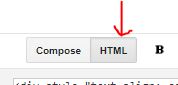
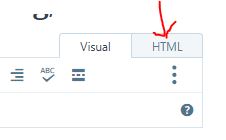
 

Now you need to know where to put this code. In the blog or website you use, find where you normally go to create a new post. There is usually a place to put HTML code. Here are two examples:

This one is from Blogspot:     blog 3

This one is from WordPress.com:      blog 2

Paste your code and save your changes. Go look at the post to see if it worked!

I hope you are as excited about this as I am. I love learning new things and I love finding things that will help my students. Please let me know how it worked for you! Best of luck!


Angle Demonstration – Using Patty Paper


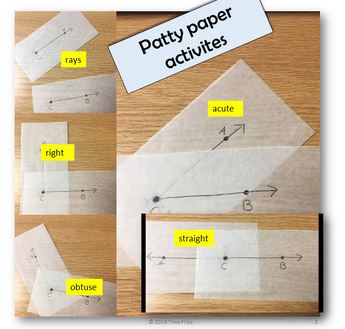
Patty paper has so many uses. One of the very first lessons in Geometry is a reminder of the different types of angles along with the definition of an angle. In the top left corner of the picture above, you can see that two rays are drawn on two pieces of patty paper. One ray is called CA and the other ray is called CB. The students can clearly see the definition of angle when you do this. When  you put the two rays together at point C, you’ve created an angle. From here, I get the students to make the different types of angles: right, obtuse, acute and straight. Finally, I get them to tape the acute one in their interactive journal. This is great for all ages and it gets the point across!

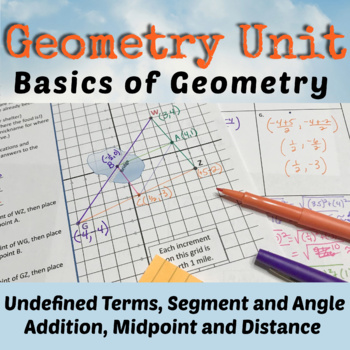
This lesson is a part of my Point, Line, Plane lesson that you can find in my store. All my Geometry lessons are in my Geometry Curriculum. You can see both resources below. Check them out!!!

More about Unit 1 – Diving Into the First Unit of Geometry Headfirst!

original-2679071-1original-2525356-1